
Lesson 3: Clean Data
Material
Download the CSV file. We will be using in this course. Use this Video to help you upload this file into Jupyter Notebook.
ACTION #1: DOWNLOAD YOUR DATASET
Do you need help downloading the dataset from Google?
Click for instructions:
ACTION #2: DOWNLOAD THE PYTHON CODE - Copy & Paste
⭐ What is Pandas?
Pandas is a Python library used to clean, analyze, and explore data.
It helps you work with tables of data (like Excel spreadsheets) using simple code.
With Pandas, you can:
Load datasets (CSV, Excel, SQL, etc.)
Fix messy data, Filter, and sort rows.
Calculate totals, averages, and statistics.
Merge multiple datasets.
Prepare data for dashboards or machine learning.
It’s one of the most important tools for data analysts because it makes working with data faster, easier, and more powerful than Excel.
Step-by-Step Instructions with the libraries:
1. Open your Jupyter Notebook.
2. At the top of the notebook, click the first empty cell.
3. Make sure the cell type says Code (not Markdown or Text).
4. Carefully type the following exactly as written: (as shown in video and more)
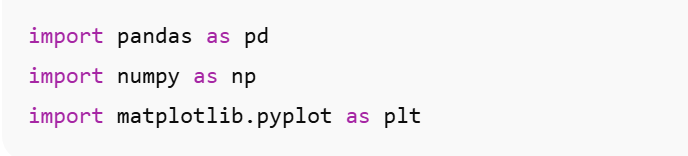
5. Press Shift + Enter on your keyboard to run the cell.
If everything is correct, the cell will run and nothing will appe
ar underneath — this means it worked successfully.
What These Lines Do (Simple Explanation)
pandas → used to work with tables of data
numpy → helps Python handle numbers
matplotlib → creates charts and graphs
** If You Get an Error
If you see a message saying the library is not installed, run this in a new cell:

Helpful Tip
Every new notebook you create will require you to run the import lines again — this is normal.